Open dataset
Open saved datasets.
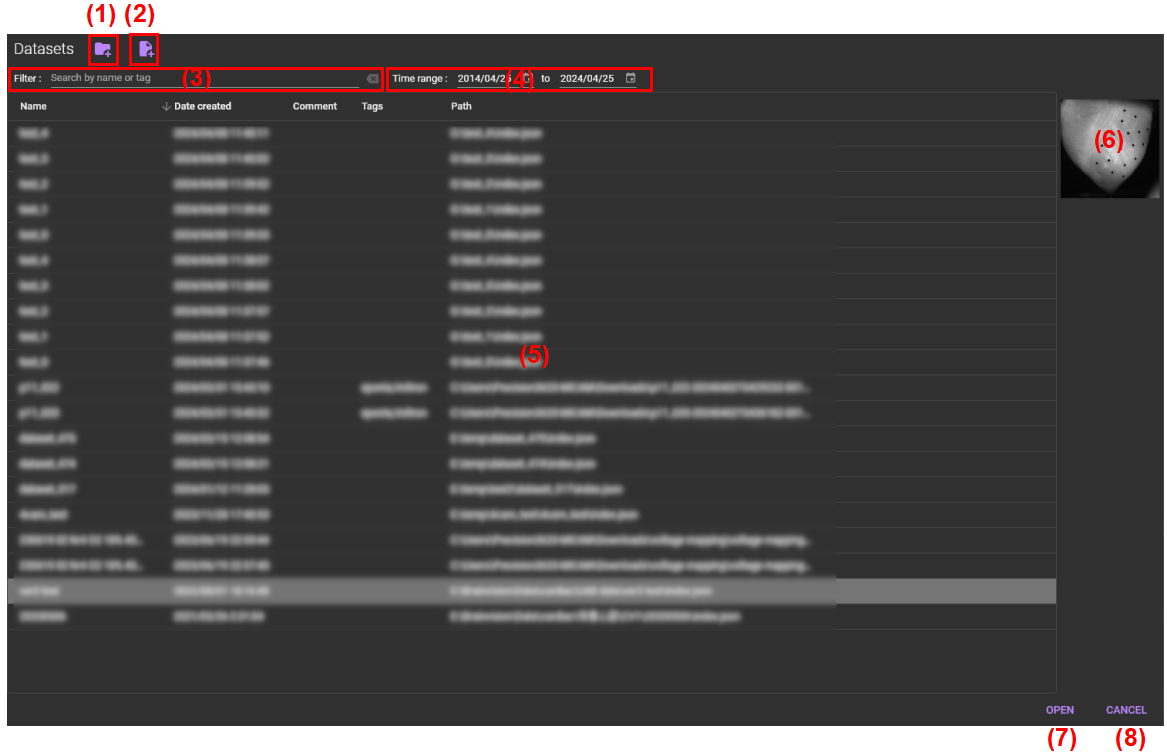
(1) Import a directory
Specify the directory (folder) in which the obtained datasets are stored. Datasets in the specified directory are displayed in a list (5) .
(2) Import a single file
Specify a file with the file extension “bvx” and add it to the file list in (5) .
(3) Filter
Please enter a keyword for data name and/or tags. Files corresponding to keyword are extracted and displayed in the file list of (5) .
(4) Time range
Please specify the range of data creation date . Only datasets that were created within that range are displayed.
(5) List of datasets
A list of datasets is displayed. You can sort the data in ascending or descending order by clicking on the table heading (name, data created, comment, tags, path).
Single-click dataset name to show preview in the (6) .
Double-click dataset name or select dataset name and then click [OPEN] to open dataset.
(6) Preview screen
The background image of dataset is displayed.
(7) Open
Open the selected dataset.
(8) Cancel
Close this screen.